How to Run a SaaS Pricing Page Test Safely
How to run a SaaS pricing page test without breaking conversions: Quick Answer: Run one SaaS pricing page test at a time, protect the plan-selection path…
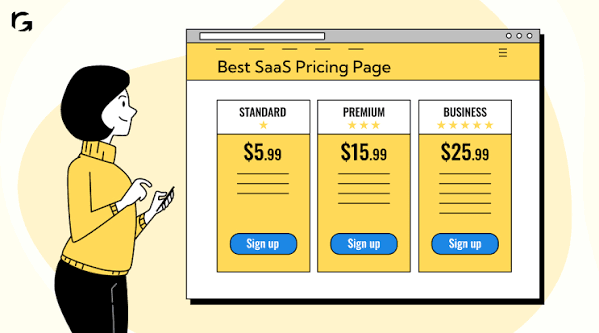
How to Run a SaaS Pricing Page Test Safely
Last updated: October 13, 2026
Quick Answer: Run one SaaS pricing page test at a time, protect the plan-selection path, and judge the result on sign-up quality as well as clicks. A pricing page test can raise revenue or quietly break conversions if you move too many pieces at once, send uneven traffic, or change the wrong part of the decision flow.
Key Takeaways
- A SaaS pricing page test checks whether one change helps more qualified visitors choose a plan without hurting trust or clarity.
- Measure the full path, not just pricing-page clicks.
- The safest test idea changes one thing in one place and targets the biggest friction point.
- Freeze the rest of the funnel, split traffic cleanly, protect revenue paths, and set a stop rule before launch.
What a SaaS pricing page test is really for
A SaaS pricing page test is for finding out whether a change helps more qualified visitors choose a plan without making the page harder to trust or understand. In the context of how to run a SaaS pricing page test without breaking conversions, that means the page must both explain value and filter buyers. If you test a headline, a billing toggle, a feature table, and a CTA color in the same experiment, you will not know which change affected the result.
The safer starting point is one decision, not five. For most software teams, that decision is one of these: does annual billing convert better than monthly, does a simpler tier structure reduce hesitation, or does showing more proof near the plans increase plan starts? Those are different hypotheses, and each needs a separate test.
This is also where pricing tests differ from ordinary landing-page tests. A pricing page has a direct revenue job, but it also sits close to checkout, trial creation, or sales handoff. If your page routes people into a self-serve flow, even a small drop in click-through can cost more than a headline win is worth. If the page is a sales-assist step, the right measure may be downstream demo quality, not just the first click.
I would not run a pricing-page test on a weak measurement stack. At minimum, you need clean event tracking for page views, CTA clicks, trial starts or checkout starts, and completed sign-ups. Without that, you are guessing from traffic rather than reading behavior.
For background on experimentation standards, I often point readers to the NIST Engineering Statistics Handbook, which covers basic inference and variability, and to the Evan Miller sample-size calculator for practical A/B planning.
What to measure before you change anything
You should measure the full path, not just the pricing-page click. A pricing test can look good on the page and still hurt sign-ups, upgrade quality, or revenue per visitor once people hit the rest of the funnel.
Start with a baseline week or two if traffic is stable enough, then record four numbers: pricing-page conversion rate to the next step, trial or checkout completion rate, plan mix, and average revenue per visitor or per signup. If you sell with a sales team, add demo requests from the pricing page and the share that turn into qualified opportunities. If you only watch one number, you can fool yourself with a “win” that shifts people into cheaper plans or lower-intent sign-ups.
Because pricing pages sit near the bottom of the funnel, I would also segment by traffic source and device before testing. A pricing page that works on desktop search traffic can behave very differently for mobile paid social visitors. That matters because a bad mobile layout or too much pricing detail can create friction fast.
The cleanest setup is one primary metric and two guardrails. The primary metric is the thing you are trying to improve, such as plan-start rate or revenue per visitor. Guardrails are the things that must not get worse, such as bounce rate, checkout completion, or sales-qualified demo rate. This keeps you from declaring success too early.
A generic article would stop at “track conversions.” That is too vague to be useful. On a SaaS pricing page, the number that matters is usually not one click. It is the chain from pricing view to committed buyer, and that chain can break in more than one place.
How do I choose the safest test idea?
The safest test idea is usually the one that changes one variable in one place and has a plausible upside that matches your biggest friction point. If your page has too many plan options, test plan structure. If visitors stall on commitment, test monthly versus annual emphasis. If they do not trust the offer, test proof near the plans. Do not test all three at once.
I would rank pricing-page test ideas by blast radius. Low-blast-radius ideas include button copy, plan labels, feature order, and proof placement. Medium-blast-radius ideas include billing periods, free-trial framing, and the number of plans shown. High-blast-radius ideas include price changes, removing a tier, or moving from public pricing to “talk to sales.” The higher the blast radius, the more careful you need to be with traffic split, duration, and rollback rules.
The best test ideas usually come from friction you can point to in session replays, support tickets, sales notes, or funnel drop-off. If people click into a plan but abandon on the next step, the issue may be uncertainty rather than price. If they never click a plan, the issue may be clarity or trust. If enterprise visitors bounce while smaller teams convert, the page may be speaking to the wrong buyer.
I would avoid “design-only” tests that make the page prettier but do not change the decision. Pretty can help, but only if it reduces confusion. A cleaner layout that hides important differences can hurt conversions.
One practical rule: if a proposed change would force you to rewrite three other parts of the funnel, it is too big for a first test. Start with the smallest change that answers the question.
How to run a SaaS pricing page test without breaking conversions
You run it by freezing the rest of the funnel, splitting traffic cleanly, protecting revenue paths, and setting a stop rule before launch. That sounds cautious because pricing tests deserve caution.
First, leave checkout, trial creation, and sales routing unchanged unless they are part of the hypothesis. If the test is about the pricing page, the next step should stay constant. Otherwise, a result on the page may really be a checkout change.
Second, use a proper random split and keep users sticky to their variant. A visitor who sees Variant A on Monday should not land in Variant B on Wednesday. If your testing tool cannot do that reliably, stop and fix the implementation before you ship anything.
Third, avoid overlapping tests on the same audience. A headline test and a pricing-layout test can interact in messy ways. If both are live, you may not know which one caused the shift.
Fourth, define guardrails in advance. For SaaS, the most useful ones are trial completion rate, checkout errors, sales lead quality, and refund or cancellation signals if you have them. If the test improves pricing-page clicks but harms the downstream rates, it is not a win.
Fifth, predefine what “done” means. I would use one of three end states: clear win, clear loss, or inconclusive. Inconclusive is not a failure. It usually means the question was too broad or the traffic too small.
A lot of teams break conversions by changing the page in the wrong order. They start with price itself, when the real problem is ambiguity in the plan comparison. They add more social proof, when the real problem is that the CTA does not match the user’s intent. Test the message before you test the margin.
What went wrong, and what it costs when pricing tests fail
Pricing-page tests fail when the measurement is too narrow, the variant is too ambitious, or the rollout ignores downstream drop-off. The cost is usually not a dramatic crash; it is a slow leak in qualified demand.
The most common failure is testing on click-through alone. A pricing page may get more plan clicks because the copy is bolder or the layout is louder, but the extra clicks can be low intent. If those visitors abandon at trial, checkout, or onboarding, the page is only renting attention. That kind of mistake costs more than the experiment budget because it can push the team to scale the wrong design.
Another failure is changing the pricing architecture without enough traffic. If you split traffic across four plans, two billing periods, and two CTAs, the sample gets thin fast. Then teams declare a winner on weak evidence and ship a page that looked better only because the numbers were noisy.
A third failure is ignoring the sales side. If the pricing page feeds demo requests, removing the “contact sales” path or burying enterprise cues can reduce lead quality even while raw clicks rise. That trade-off matters for software buyers who need procurement, security review, or custom terms; for those cases, you should consult your sales, procurement, or legal teams and rely on your internal review process rather than assuming one page change is safe. A self-serve-only mindset is wrong for those accounts.
The simplest cost to explain is opportunity cost. While the team runs a bad test, the page stays confusing, and no one learns which part of the offer is actually blocking buyers. That is why I prefer smaller tests with a tight hypothesis over dramatic redesigns.
This is also the section many generic guides skip: a pricing-page test is not safe because it is “just a page.” It is safe only when the rest of the funnel is protected and the success metric reflects the business, not the screenshot.
Before/after: what to capture in the test readout
A useful pricing-page test readout should show the path, not only the page. I would build the summary around a simple table so the team can see where the movement happened.
| Metric | Before | After | Change | Timeline |
|---|---|---|---|---|
| Pricing page visits | baseline period | variant period | compare like for like | same test window |
| CTA clicks | baseline | variant | up or down | same test window |
| Trial or checkout starts | baseline | variant | up or down | same test window |
| Completed sign-ups | baseline | variant | up or down | same test window |
| Revenue per visitor | baseline | variant | up or down | same test window |
| Qualified sales leads, if relevant | baseline | variant | up or down | same test window |
I would not publish a readout that leaves out one of those rows. A pricing page can improve one step and damage another. The table should make that visible in one minute.
The timeline row matters too. If a result came from a short burst, say so. If it ran through a full billing cycle or at least a weekday/weekend mix, say that. If the test stopped early because one version caused a clear drop in checkout starts, note that as well. Teams need to know not just what happened, but how quickly the signal appeared.
If you have enough traffic, I would also add a split by device. Many pricing-page issues show up first on mobile. A test that works on desktop but weakens mobile plan selection is not a clean win.
When should you ship the winning version?
You should ship the winning version only after the primary metric improves and the guardrails stay inside your acceptable range. If the result is mixed, I would usually keep the safer version live and run a second test with a narrower question.
That sounds conservative, but pricing pages are not the place for reckless optimism. A modest lift in clicks is not worth a drop in actual sign-ups. Likewise, a prettier plan card is not worth a slower page if your audience is already impatient.
The best rollout is staged. First, validate that the variant behaves the same across your main traffic sources. Then, if the result is stable, ship it fully and keep watching the downstream funnel for a few days or a full billing cycle, depending on how your product converts. If you sell annual plans or involve sales, the real signal may take longer than a few hours.
I would not keep iterating on the same test forever. Once you have a clear answer, move to the next bottleneck. If plan layout was the issue, test trust signals next. If monthly-versus-annual framing won, test where and how that choice is explained. Pricing optimization is a sequence, not a single project.
A test is worth shipping when it helps the right buyer decide faster. If it only makes the page louder, not clearer, I would leave it behind.
FAQ: pricing page tests in SaaS
How long should a SaaS pricing page test run?
It should run long enough to collect a stable read on the primary metric and the guardrails, which often means at least one full business cycle and sometimes longer if traffic is low.
What should I test first on a pricing page?
I would start with the biggest point of confusion: plan structure, billing period, proof near the plans, or CTA wording. The first test should answer one decision.
Can I test price changes safely?
Yes, but price changes are high impact and usually high risk. I would only test them with a clear hypothesis, strong measurement, and a plan for revenue as well as conversion.
What is the biggest mistake teams make?
They judge the test on page clicks alone and ignore what happens after the click.
Is it okay to run multiple pricing-page tests at once?
Only if they affect different audiences or different parts of the funnel with no overlap. Otherwise, the results can blur together and become useless.
Drafted with AI; not yet reviewed by a person.